Merhaba.
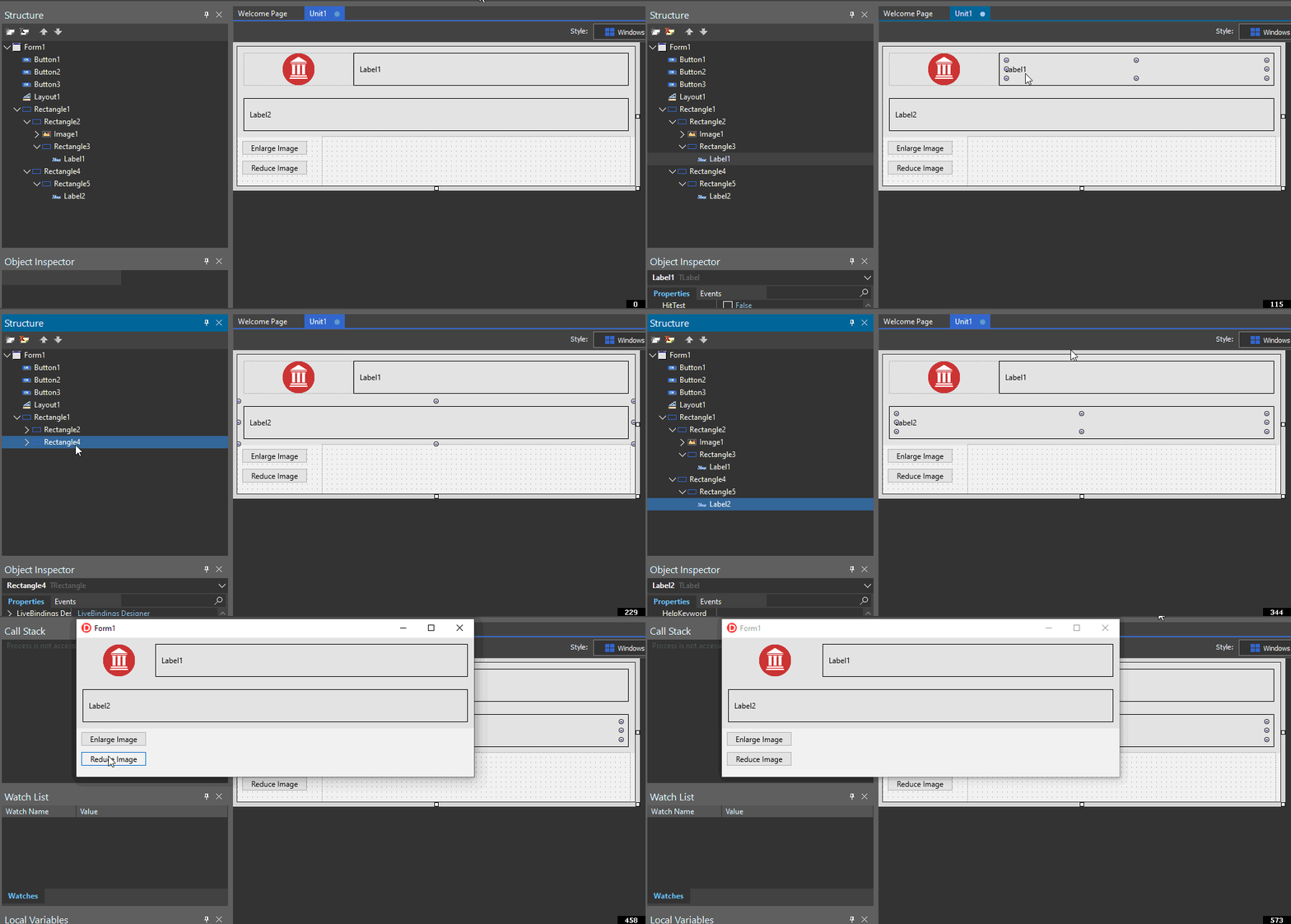
Talebiniz bu aşağıdaki gibi bir ekran değil midir ? Daha önceki mesajımda da belirttiğim şekilde sadece Owner / Parent oynaması ile basitçe çözülebilecek şekilde hazırlayabilirsiniz.
Mouse ile tıklayıp animasyonu büyütebilirsiniz.
Bir formül olarak aşağıdaki kodu da çözümleme için kullanabilirsiniz, nereye pad konuldu, hangi label hangi rectangle altında, hangi bileşen align.TOP, CLIENT vs.
Formunuza öncelikle bir TLayout koyup, aşağıdaki gibi deneyebilirsiniz.
procedure PrepareGoodies( aLayout: TLayout );
var
 aMainRctn   : TRectangle;

 aSubsRctn1  : TRectangle;
 aLablRctn1  : TRectangle;
 aImage1     : TImage;
 aLabel1     : TLabel;

 aSubsRctn2  : TRectangle;
 aLablRctn2  : TRectangle;
 aLabel2     : TLabel;
begin
 aMainRctn := TRectangle.Create(aLayout);
 With aMainRctn do begin
   Parent  := aLayout;
   Align   := TAlignLayout.Top;
   Height  := 200;
   Stroke.Kind := TBrushKind.None;
 end;

 aSubsRctn1 := TRectangle.Create(aLayout);
 With aSubsRctn1 do begin
   Parent  := aMainRctn;
   Align   := TAlignLayout.Top;
   Height  := 100;
   Stroke.Kind := TBrushKind.None;
   Padding.Left    := 10;
   Padding.Right   := 10;
   Padding.Top     := 10;
   Padding.Bottom  := 10;
 end;

 aSubsRctn2 := TRectangle.Create(aLayout);
 With aSubsRctn2 do begin
   Parent  := aMainRctn;
   Align   := TAlignLayout.Top;
   Height  := 100;
   Stroke.Kind := TBrushKind.None;
   Padding.Left    := 10;
   Padding.Right   := 10;
   Padding.Top     := 10;
   Padding.Bottom  := 10;

   Position.Y      := 101;
 end;


 aImage1    := TImage.Create(aLayout);
 With aImage1 do begin
   Parent  := aSubsRctn1;
   Align   := TAlignLayout.Left;
   Width   := 100;
   Bitmap.SetSize( Trunc(Width), Trunc(Height) );
   Bitmap.Clear( TAlphaColors.Red );
 end;

// Label 1

 aLablRctn1 := TRectangle.Create(aLayout);
 With aLablRctn1 do begin
   Parent  := aSubsRctn1;
   Align   := TAlignLayout.Client;
   Padding.Left    := 20;
   Padding.Right   := 20;
   Padding.Top     := 20;
   Padding.Bottom  := 20;
 end;

 aLabel1    := TLabel.Create(aLayout);
 With aLabel1 do begin
   Parent    := aLablRctn1;
   Align     := TAlignLayout.Client;
   StyledSettings := [];
   Font.Size := 22;
   Text      := 'Hello World...';
 end;

// Label 2

 aLablRctn2 := TRectangle.Create(aLayout);
 With aLablRctn2 do begin
   Parent  := aSubsRctn2;
   Align   := TAlignLayout.Client;
   Padding.Left    := 20;
   Padding.Right   := 20;
   Padding.Top     := 20;
   Padding.Bottom  := 20;
 end;

 aLabel2    := TLabel.Create(aLayout);
 With aLabel2 do begin
   Parent    := aLablRctn2;
   Align     := TAlignLayout.Client;
   StyledSettings := [];
   Font.Size := 22;
   Text      := 'This is another Label text...';
 end;
end;
Kullanımı :
procedure TForm1.Button1Click(Sender: TObject);
begin
  PrepareGoodies( Layout1 );
end;
(23-06-2020, Saat: 09:12)mrmarman Adlı Kullanıcıdan Alıntı: [ -> ]Merhaba.
Talebiniz bu aşağıdaki gibi bir ekran değil midir ? Daha önceki mesajımda da belirttiğim şekilde sadece Owner / Parent oynaması ile basitçe çözülebilecek şekilde hazırlayabilirsiniz.
Mouse ile tıklayıp animasyonu büyütebilirsiniz.
Bir formül olarak aşağıdaki kodu da çözümleme için kullanabilirsiniz, nereye pad konuldu, hangi label hangi rectangle altında, hangi bileşen align.TOP, CLIENT vs.
Formunuza öncelikle bir TLayout koyup, aşağıdaki gibi deneyebilirsiniz.
procedure PrepareGoodies( aLayout: TLayout );
var
 aMainRctn   : TRectangle;

 aSubsRctn1  : TRectangle;
 aLablRctn1  : TRectangle;
 aImage1     : TImage;
 aLabel1     : TLabel;

 aSubsRctn2  : TRectangle;
 aLablRctn2  : TRectangle;
 aLabel2     : TLabel;
begin
 aMainRctn := TRectangle.Create(aLayout);
 With aMainRctn do begin
   Parent  := aLayout;
   Align   := TAlignLayout.Top;
   Height  := 200;
   Stroke.Kind := TBrushKind.None;
 end;

 aSubsRctn1 := TRectangle.Create(aLayout);
 With aSubsRctn1 do begin
   Parent  := aMainRctn;
   Align   := TAlignLayout.Top;
   Height  := 100;
   Stroke.Kind := TBrushKind.None;
   Padding.Left    := 10;
   Padding.Right   := 10;
   Padding.Top     := 10;
   Padding.Bottom  := 10;
 end;

 aSubsRctn2 := TRectangle.Create(aLayout);
 With aSubsRctn2 do begin
   Parent  := aMainRctn;
   Align   := TAlignLayout.Top;
   Height  := 100;
   Stroke.Kind := TBrushKind.None;
   Padding.Left    := 10;
   Padding.Right   := 10;
   Padding.Top     := 10;
   Padding.Bottom  := 10;

   Position.Y      := 101;
 end;


 aImage1    := TImage.Create(aLayout);
 With aImage1 do begin
   Parent  := aSubsRctn1;
   Align   := TAlignLayout.Left;
   Width   := 100;
   Bitmap.SetSize( Trunc(Width), Trunc(Height) );
   Bitmap.Clear( TAlphaColors.Red );
 end;

// Label 1

 aLablRctn1 := TRectangle.Create(aLayout);
 With aLablRctn1 do begin
   Parent  := aSubsRctn1;
   Align   := TAlignLayout.Client;
   Padding.Left    := 20;
   Padding.Right   := 20;
   Padding.Top     := 20;
   Padding.Bottom  := 20;
 end;

 aLabel1    := TLabel.Create(aLayout);
 With aLabel1 do begin
   Parent    := aLablRctn1;
   Align     := TAlignLayout.Client;
   StyledSettings := [];
   Font.Size := 22;
   Text      := 'Hello World...';
 end;

// Label 2

 aLablRctn2 := TRectangle.Create(aLayout);
 With aLablRctn2 do begin
   Parent  := aSubsRctn2;
   Align   := TAlignLayout.Client;
   Padding.Left    := 20;
   Padding.Right   := 20;
   Padding.Top     := 20;
   Padding.Bottom  := 20;
 end;

 aLabel2    := TLabel.Create(aLayout);
 With aLabel2 do begin
   Parent    := aLablRctn2;
   Align     := TAlignLayout.Client;
   StyledSettings := [];
   Font.Size := 22;
   Text      := 'This is another Label text...';
 end;
end;
Kullanımı :
procedure TForm1.Button1Click(Sender: TObject);
begin
  PrepareGoodies( Layout1 );
end;
cebanız ve emeğiniz için teşekkür ederim,
eklediğim attachmentlere göz atarsanız aslında yapmak istediğimi anlatmıştım,
ben bir chat ekranı yapmak istiyorum, bu chat ekranını yazılarınında silinmesi gerekir mesela sayfa açılınca,
ve ben yazıların tek label de olmasını istiyorum siz 2 label kullanmışsınız,
örneğin program android de çalışınca 2 label bize düzgün bir görünüm sunmuyor,
boşluk karakterinin genişliği ile a karakterinin genişliğide aynı olmuyor.
Sorunuzu yanlış anlamışım, yani yazılan yazının image etrafına sarılmasını istiyorsunuz... Yani her image bir metin gibi davranacak ya da tersi. Bu durumda en basit çözüm TAG eşliğindeki HTML çıktı kullanmak.
(23-06-2020, Saat: 14:13)sadettinpolat Adlı Kullanıcıdan Alıntı: [ -> ]Fmx desteği olan aşağıdaki bileşenlere gözatabilirsiniz.
https://delphihtmlcomponents.com/comp.html

evet o componenti satın aldık, alexander sviridenkov hemen halletti isteğimizi hatta demoda göndermişti
merak edenler olabilir diye linki ekliyorum,
http://delphihtmlcomponents.com/chatdemofmx3.zip
ve bu yolla 2 satır arasında pixel boşluğunuda helletmiş olduk, ve webbrowser arka zeminide transparent yapabiliyoruz,
yani arkaya timage koyabiliyoruz.