
+- Delphi Can (https://www.delphican.com)
+-- Forum: Delphi (https://www.delphican.com/forumdisplay.php?fid=3)
+--- Forum: Mobil Platform - FireMonkey (FMX) (https://www.delphican.com/forumdisplay.php?fid=7)
+--- Konu Başlığı: TPie nesnesi yanına etiket yazdırma (/showthread.php?tid=5983)
TPie nesnesi yanına etiket yazdırma - 41linea41 - 10-05-2021
Merhaba
[attachment=1745]
TPie kullnarak bir pasta grafik oluşturuyorum. Üstüste create edilen her TPie nesnesinin start angle noktasına bir TText yada Tlabel create etmek istiyorum.
Tpie nesnesinde Start angle başladığı noktayı nasıl tespit edebilirim?
İyi Çalışmalar.
TPie nesnesi yanına etiket yazdırma - abdullahcetinel - 12-05-2021
Chart1.SeriesList.ClearValues;
DataModule1.tblsorgu.Close;
DataModule1.tblsorgu.SQL.Clear;
DataModule1.tblsorgu.SQL.Add('Select Sum(Tutar) as ToplamBorc');
DataModule1.tblsorgu.SQL.Add('From tblislem');
DataModule1.tblsorgu.SQL.Add('Where Tipi=''Borc''');
DataModule1.tblsorgu.Open;
toplamborc:=DataModule1.tblsorgu.FieldByName('ToplamBorc').Value;
Chart1.Series[0].AddY(toplamborc, 'Toplam Borç', TAlphaColorRec.Crimson);
DataModule1.tblsorgu.Close;
DataModule1.tblsorgu.SQL.Clear;
DataModule1.tblsorgu.SQL.Add('Select Sum(Tutar) as ToplamOdeme');
DataModule1.tblsorgu.SQL.Add('From tblislem');
DataModule1.tblsorgu.SQL.Add('Where Tipi=''Odeme''');
DataModule1.tblsorgu.Open;
toplamodeme:=ABS(DataModule1.tblsorgu.FieldByName('ToplamOdeme').Value);
Chart1.Series[0].AddY(toplamodeme, 'Toplam Ödeme', TAlphaColorRec.Lightgreen);
DataModule1.tblsorgu.Close;
DataModule1.tblsorgu.SQL.Clear;
DataModule1.tblsorgu.SQL.Add('Select Sum(Tutar) as Bakiye');
DataModule1.tblsorgu.SQL.Add('From tblislem');
DataModule1.tblsorgu.Open;
kalanbakiye:=DataModule1.tblsorgu.FieldByName('Bakiye').Value;
Chart1.Series[0].AddY(kalanbakiye, 'Alacağım', TAlphaColorRec.Skyblue);
Bu şekilde chart nesnesini kullanıyorum.
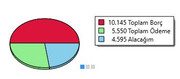
Cvp: TPie nesnesi yanına etiket yazdırma - 41linea41 - 12-05-2021
(12-05-2021, Saat: 12:29)abdullahcetinel Adlı Kullanıcıdan Alıntı: Chart1.SeriesList.ClearValues;Merhaba
DataModule1.tblsorgu.Close;
DataModule1.tblsorgu.SQL.Clear;
DataModule1.tblsorgu.SQL.Add('Select Sum(Tutar) as ToplamBorc');
DataModule1.tblsorgu.SQL.Add('From tblislem');
DataModule1.tblsorgu.SQL.Add('Where Tipi=''Borc''');
DataModule1.tblsorgu.Open;
toplamborc:=DataModule1.tblsorgu.FieldByName('ToplamBorc').Value;
Chart1.Series[0].AddY(toplamborc, 'Toplam Borç', TAlphaColorRec.Crimson);
DataModule1.tblsorgu.Close;
DataModule1.tblsorgu.SQL.Clear;
DataModule1.tblsorgu.SQL.Add('Select Sum(Tutar) as ToplamOdeme');
DataModule1.tblsorgu.SQL.Add('From tblislem');
DataModule1.tblsorgu.SQL.Add('Where Tipi=''Odeme''');
DataModule1.tblsorgu.Open;
toplamodeme:=ABS(DataModule1.tblsorgu.FieldByName('ToplamOdeme').Value);
Chart1.Series[0].AddY(toplamodeme, 'Toplam Ödeme', TAlphaColorRec.Lightgreen);
DataModule1.tblsorgu.Close;
DataModule1.tblsorgu.SQL.Clear;
DataModule1.tblsorgu.SQL.Add('Select Sum(Tutar) as Bakiye');
DataModule1.tblsorgu.SQL.Add('From tblislem');
DataModule1.tblsorgu.Open;
kalanbakiye:=DataModule1.tblsorgu.FieldByName('Bakiye').Value;
Chart1.Series[0].AddY(kalanbakiye, 'Alacağım', TAlphaColorRec.Skyblue);
Bu şekilde chart nesnesini kullanıyorum.
Cevabınız için teşekkürler. Youtube da TPie ile Chart oluşturma videosu dikkatimi çekti aynısını yapmaya çalıştım.
Ama başarılı olamadım. Videoyu yükleyen kişi kodları paylaşmamış. Videoya bakarak kodlarıda aldım debug da hata vermiyor.
Uygulama açılınca Access Violation alıyorum.
Daha tecrübeli forum üyeleri kodu çözebilirse herkes için Tpie ile chart kullanışlı bir komponent olabilir.
.pas:
unit Unit1;

interface

uses
 System.SysUtils, System.Types, System.UITypes, System.Classes, System.Variants,
 FMX.Types, FMX.Controls, FMX.Forms, FMX.Graphics, FMX.Dialogs, FMX.Objects,
 FMX.StdCtrls, FMX.Controls.Presentation, FMX.Ani, FMX.Styles.Objects,
 FMX.Layouts;

type

 TDataPie =Record
    B:String;
    W:Single;
    C:TAlphaColor;
 End;


 TForm1 = class(TForm)
   Rectangle1: TRectangle;
   ToolBar1: TToolBar;
   Switch1: TSwitch;
   btnOlustur: TButton;
   Pie1: TPie;
   Circle1: TCircle;
   Text1: TText;
   StyleObject1: TStyleObject;
   FloatAnimation1: TFloatAnimation;
   Text2: TText;
   procedure btnOlusturClick(Sender: TObject);
   procedure FormCreate(Sender: TObject);
   procedure FloatAnimation1Process(Sender: TObject);
   procedure Switch1Switch(Sender: TObject);
 private
   { Private declarations }
   FSeries:Array of TDataPie;
   FSum:Single;
 public
   { Public declarations }
   procedure ShowPieChart;
   procedure Ciz;
 end;

var
 Form1: TForm1;

implementation

{$R *.fmx}

procedure TForm1.btnOlusturClick(Sender: TObject);
begin
 ciz;
 ShowPieChart;
end;

procedure TForm1.Ciz;
var
A:Integer;
S:Single;
const
Bezeich: Array [0..6] of string =('AA','BB','CC','DD','EE','FF','GG');
ColorKey:Array[0..6] of Talphacolor= ($FFFFE0,$6495ED,$FFEBCD,$F5F5DC,
$1E90FF,$F0F8FF,$FAEBD7);
begin
  Fsum:=0;
  SetLength(FSeries, 2+ Random(6));
  for A:=Low(FSeries) to High(FSeries) do
   begin
     s:=10+Random(1000);
     Fseries[A].B:=Bezeich[A];
     Fseries[A].W:=S;
     Fseries[A].C:=ColorKey[A];
     FSum:=Fsum + s;


   end;
   showpiechart;

end;

procedure TForm1.FloatAnimation1Process(Sender: TObject);
begin
with FloatAnimation1 do
{ begin
  text1.Text:=inttostr(round(((1/360)*(90+pie1.StartAngle))*100))+'%';
  text2.Text:=text1.Text;
  styleobject1.Opacity:=Currenttime;
end;
}
end;

procedure TForm1.FormCreate(Sender: TObject);
begin
RandSeed:=86602681;
Fill.Kind:=TBrushKind.Solid;
Rectangle1.Fill.Assign(Self.Fill);
Rectangle1.Stroke.Kind:=TBrushKind.None;
Circle1.Fill.Assign(Self.Fill);
Circle1.Stroke.Kind:=TBrushKind.None;
Text1.Text:='';
Text2.text:='';
Pie1.Stroke.Kind:=Tbrushkind.None;
Pie1.Fill.Assign(Self.Fill);
Rectangle1.Padding.Rect:=Trect.Create(5,5,5,5);
pie1.Align:=TAlignLayout.Contents;

ciz;
Showpiechart;


end;

procedure TForm1.ShowPieChart;
var
K:TFmxObject;
F,E,H,R,M:Single;
A:Integer;
P:Tpie;
S:String;
L:TLayout;
T:TText;
begin
try


Rectangle1.RemoveObject(Pie1);
Rectangle1.RemoveObject(StyleObject1);
while Rectangle1.ChildrenCount > 0 do
 for K in Rectangle1.Children  do
   begin
     Rectangle1.RemoveObject(K);
     K.Free;
   end;
  StyleObject1:=Tstyleobject.Create(nil);
  if switch1.IsChecked then F:=0.1 else F:=0.3;
  //create view

  E:=-90;
  for A := Low(FSeries) to High(FSeries) do
   begin
     P:=TPie.Create(nil);
     P.StartAngle:=E;
     R:=(FSeries[A].W/FSum)*360;
     P.EndAngle:=E+R;
     M:=E+R*0.5;
     E:=P.EndAngle;
     P.Fill.Color:=FSeries[A].C;
     P.Stroke.Kind:=tbrushkind.None;
     rectangle1.AddObject(P);
     p.Align:=TAlignLayout.Client;
     S:=inttostr(Round((FSeries[A].W/FSum)*100))
     +'%'+linefeed+Fseries[A].B;
     if TOSVersion.platform=tosversion.TPlatform.pfWindows then
      begin
        P.ShowHint:=True;
        P.Hint:=S;
      end;

      L:=TLayout.create(nil);

      //L.setbounds(0,0,0,0);
      L.RotationCenter.Point:=TpointF.Zero;
      Styleobject1.AddObject(L);
      with rectangle1.LocalRect.CenterPoint do
         L.setbounds(X,Y,0,0);
       //  L.Position:=Rectangle1.LocalRect.CenterPoint;
        l.RotationAngle:=M;
        T:=TText(Text1.Clone(nil));
        T.Align:=TAlignLayout.None;
        t.Width:=80;
        t.Text:=s;
        TText(T.Children[0]).text:=S;
        l.Width:=(Rectangle1.LocalRect.BottomRight.Length
        *F)+(t.LocalRect.BottomRight.Length* 0.5);
        StyleObject1.AddObject(T);
        t.Position.Point:=StyleObject1.AbsoluteToLocal(L.AbsoluteRect.BottomRight)-
          T.localrect.CenterPoint;


   end;

   pie1.StartAngle:=-90;
   pie1.EndAngle:=270;
   Rectangle1.AddObject(pie1);
   Rectangle1.AddObject(styleobject1);
   FloatAnimation1.Start;
 except on E: Exception do
 //ShowMessage(e.Message);
end;
end;

procedure TForm1.Switch1Switch(Sender: TObject);
begin
ShowPieChart;
end;

end.
.dfm
object Form1: TForm1
 Left = 0
 Top = 0
 Caption = 'Form1'
 ClientHeight = 480
 ClientWidth = 598
 FormFactor.Width = 320
 FormFactor.Height = 480
 FormFactor.Devices = [Desktop]
 OnCreate = FormCreate
 DesignerMasterStyle = 0
 object Rectangle1: TRectangle
   Align = Center
   Size.Width = 271.000000000000000000
   Size.Height = 272.000000000000000000
   Size.PlatformDefault = False
   object Pie1: TPie
     Align = Client
     Size.Width = 271.000000000000000000
     Size.Height = 272.000000000000000000
     Size.PlatformDefault = False
     StartAngle = -90.000000000000000000
     EndAngle = 270.000000000000000000
     object Circle1: TCircle
       Align = Center
       Size.Width = 271.000000000000000000
       Size.Height = 80.000000000000000000
       Size.PlatformDefault = False
       object Text1: TText
         Position.X = 104.000000000000000000
         Position.Y = 16.000000000000000000
         Size.Width = 66.000000000000000000
         Size.Height = 49.000000000000000000
         Size.PlatformDefault = False
         TextSettings.Font.StyleExt = {00070000000000000004000000}
         object Text2: TText
           Position.X = 13.000000000000000000
           Position.Y = 4.000000000000000000
           Size.Width = 43.000000000000000000
           Size.Height = 41.000000000000000000
           Size.PlatformDefault = False
         end
       end
     end
     object FloatAnimation1: TFloatAnimation
       Duration = 0.200000002980232200
       OnProcess = FloatAnimation1Process
       StartValue = 0.000000000000000000
       StopValue = 0.000000000000000000
     end
   end
 end
 object ToolBar1: TToolBar
   Size.Width = 598.000000000000000000
   Size.Height = 40.000000000000000000
   Size.PlatformDefault = False
   TabOrder = 1
   object Switch1: TSwitch
     IsChecked = False
     Position.X = 224.000000000000000000
     Position.Y = 8.000000000000000000
     TabOrder = 0
     OnSwitch = Switch1Switch
   end
   object btnOlustur: TButton
     Position.X = 32.000000000000000000
     Position.Y = 16.000000000000000000
     TabOrder = 1
     Text = 'olustur'
     OnClick = btnOlusturClick
   end
 end
 object StyleObject1: TStyleObject
   Position.X = 128.000000000000000000
   Position.Y = 96.000000000000000000
   Size.Width = 305.000000000000000000
   Size.Height = 297.000000000000000000
   Size.PlatformDefault = False
   SourceLink = <>
 end
end