
+- Delphi Can (https://www.delphican.com)
+-- Forum: Delphi (https://www.delphican.com/forumdisplay.php?fid=3)
+--- Forum: Mobil Platform - FireMonkey (FMX) (https://www.delphican.com/forumdisplay.php?fid=7)
+--- Konu Başlığı: deployment hatası (/showthread.php?tid=6222)
deployment hatası - sokratayb - 19-08-2021
rad 10.4 ile çalışıyorum mobilde çıktı almak istediğimde böyle bir hata ile karşılaşıyorum yardımcı olabilir misiniz?
[PAClient Error] Error:E0004 File does not exist:<Projenin Dosya Yolu>._@emp_.tmp
deployment hatası - ozcanm - 19-08-2021
Merhaba,
Öncelikle projenizi kaydetmeniz gerekiyor olabilir mi?
Cvp: deployment hatası - sokratayb - 19-08-2021
(19-08-2021, Saat: 10:18)ozcanm Adlı Kullanıcıdan Alıntı: Merhaba,Kayıtlı fakat aynı hatayı alıyorum .
Öncelikle projenizi kaydetmeniz gerekiyor olabilir mi?
deployment hatası - Rnd0M - 19-08-2021
önce projeyi build etmeniz gerekir.
deployment hatası - ozcanm - 20-08-2021
Embarcadero dökümanlarında şöyle bir açıklama var,
Alıntı:E0004 File does not exist: 'path'
Go Up to Platform Assistant Server Errors Index
If you get this error while you use the IDE and the error contains the following message:
[PAClient Error] Error: E0004 File does not exist: <path to temporary file>
The issue may be that your system environment variables define a variable, "Platform", with a value that RAD Studio considers valid, such as "Win64" or "iOSDevice", but which does not match the platform that is currently selected.
If you cannot or do not want to remove this environment variable from your system (another application might be using it), select Tools > Options > Environment Options > Environment Variables and create here a "Platform" environment variable for RAD Studio only, and give this variable the code name of your selected target platform.
Note: You may need to modify this value again when you change your selected target platform.
If you run the Platform Assistant client manually and you specify a path to a source file that does not exist when using any of the following command line options:
-g or --get
-u or --put
If you use -g or --get, you only get this error message if you set an error number, with the -e or --error command-line option, that is at least as high as the number of missing files. The default value is 20, so unless you try to get at least 20 files at once that do not exist, you cannot get this error. You can use the command-line parameter -e1 to make the Platform Assistant client throw this error even if only one file is missing.
For more information, run the Platform Assistant client either with the -? or with the --help command-line option to see the command-line help.
Kaynak : Bakınız.
Cvp: deployment hatası - sokratayb - 20-08-2021
(19-08-2021, Saat: 18:07)Rnd0M Adlı Kullanıcıdan Alıntı: önce projeyi build etmeniz gerekir.
build etmek derken çalıştırmaktan bahsetmiyor musunuz ?
(20-08-2021, Saat: 08:48)ozcanm Adlı Kullanıcıdan Alıntı: Embarcadero dökümanlarında şöyle bir açıklama var,
Alıntı:E0004 File does not exist: 'path'
Go Up to Platform Assistant Server Errors Index
If you get this error while you use the IDE and the error contains the following message:
[PAClient Error] Error: E0004 File does not exist: <path to temporary file>
The issue may be that your system environment variables define a variable, "Platform", with a value that RAD Studio considers valid, such as "Win64" or "iOSDevice", but which does not match the platform that is currently selected.
If you cannot or do not want to remove this environment variable from your system (another application might be using it), select Tools > Options > Environment Options > Environment Variables and create here a "Platform" environment variable for RAD Studio only, and give this variable the code name of your selected target platform.
Note: You may need to modify this value again when you change your selected target platform.
If you run the Platform Assistant client manually and you specify a path to a source file that does not exist when using any of the following command line options:
-g or --get
-u or --put
If you use -g or --get, you only get this error message if you set an error number, with the -e or --error command-line option, that is at least as high as the number of missing files. The default value is 20, so unless you try to get at least 20 files at once that do not exist, you cannot get this error. You can use the command-line parameter -e1 to make the Platform Assistant client throw this error even if only one file is missing.
For more information, run the Platform Assistant client either with the -? or with the --help command-line option to see the command-line help.
Kaynak : Bakınız.
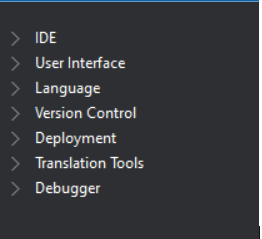
burda environment diye bişey yok ? nerden bulabilirim o yolu