
+- Delphi Can (https://www.delphican.com)
+-- Forum: Delphi (https://www.delphican.com/forumdisplay.php?fid=3)
+--- Forum: Genel Programlama (https://www.delphican.com/forumdisplay.php?fid=6)
+--- Konu Başlığı: ListViewe Çalışan Uygulamaların İkonlarını Nasıl Ekleyebilirim (/showthread.php?tid=6469)
ListViewe Çalışan Uygulamaların İkonlarını Nasıl Ekleyebilirim - COMMANDX - 08-12-2021
Arkadaşlar çok uğraştım fakat başaramadım
Listviewe Çalışan Uygulamaları, Pathini ve Pencere Başlıklarını Kısmen de olsa atabiliyorum (İşlemlerin Erişimleri nedeniyle)
Fakat İkonlarını atmayı başaramadım
Yaklaşık Şöyle Olması gerekiyor.

ListViewe Çalışan Uygulamaların İkonlarını Nasıl Ekleyebilirim - mrmarman - 08-12-2021
Merhaba...
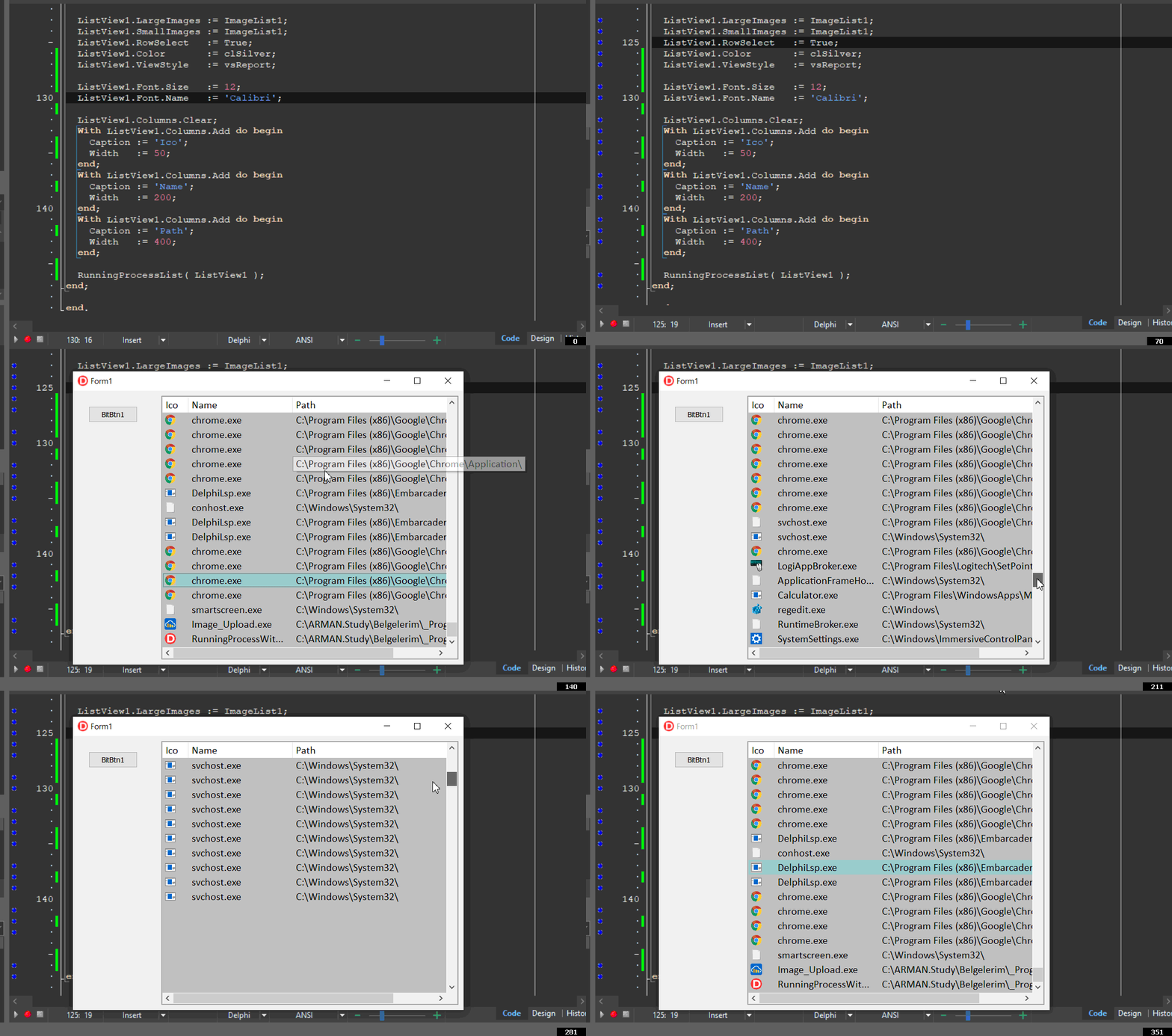
Şu şekilde bir yapıyı eskiden kullanmış ve arşivlemiştim. Sizin için örnek bir proje halinde sadeleştirdim.
Forma :
- Liste ve detaylar için bir adet TListView
- Iconların yer alacağı ve aynı zamanda ListView'in satır yüksekliğinin belirlemesi için bir tane TImageList
- Bir de buton koyun...
Uses ShellApi, TLHelp32, PsAPI;

procedure AddFile_SetIcon( aFileName, aFilePath: String; aListView:TListView );
var
 LBuffer     : array[0..2048] of char;
 LIconIndex  : word;
 LIconHandle : HIcon;
 LIcon       : TIcon;

 LBitmap     : TBitmap;
 LTempBitmap : TBitmap;
begin
 LIcon       := TIcon.Create;
 LBitmap     := TBitmap.Create;
 LTempBitmap := TBitmap.Create;
 try
   StrCopy(@LBuffer, PChar(aFilePath+aFileName));
   LIconIndex  := 0;
   LIconHandle := ShellApi.ExtractAssociatedIcon(HInstance, LBuffer, LIconIndex);
   if LIconHandle <> 0 then
     LIcon.Handle := LIconHandle;
   LTempBitmap.Width   := LIcon.Width;
   LTempBitmap.Height  := LIcon.Height;
   LTempBitmap.Canvas.Brush.Color := aListView.Color;
   LTempBitmap.Canvas.Brush.Style := bsSolid;
   LTempBitmap.Canvas.FillRect(LTempBitmap.Canvas.ClipRect);
   LTempBitmap.Canvas.Draw( 0, 0, LIcon );

   LBitmap.Width   := aListView.SmallImages.Width;
   LBitmap.Height  := aListView.SmallImages.Height;
   LBitmap.Canvas.StretchDraw(Rect(0, 0, LBitmap.Width, LBitmap.Height), LTempBitmap);

   aListView.SmallImages.Add(LBitmap, nil);
   With aListView.Items.Add do
   begin
     ImageIndex := aListView.SmallImages.Count-1;
     SubItems.Add( aFileName );
     SubItems.Add( aFilePath );
   end;
 finally
   LIcon.Free;
   LBitmap.Free;
   LTempBitmap.Free;
 end;
end;

procedure RunningProcessList( aList: TListView );
 function GetMFEx(aProcessId: THandle): string;
 var
   hProcess  : THandle;
   ModuleName: array [0..300] of Char;
 begin
   hProcess := OpenProcess(PROCESS_QUERY_INFORMATION or PROCESS_VM_READ,
               False, aProcessId);
   if (hProcess <> 0) then
     begin
       GetModuleFilenameEx(hProcess, 0, ModuleName, SizeOf(ModuleName));
       CloseHandle(hProcess);
       Result := ModuleName;
     end;
 end;
var
 LHandle     : THandle;
 LStruct     : TProcessEntry32;
 LFileName   : String;
 LFilePath   : String;
 LNext       : boolean;
begin
 aList.Items.Clear;
 aList.SmallImages.Clear;
 try
   LStruct         := Default(TProcessEntry32);
   LHandle         := CreateToolHelp32SnapShot(TH32CS_SNAPPROCESS, 0);
   LStruct.dwSize  := Sizeof(TProcessEntry32);
   LNext := Process32First(LHandle, LStruct);
   while LNext do
   begin
     LFilePath := ExtractFilePath(GetMFEx(LStruct.Th32ProcessID));
     LFileName := LStruct.szExeFile;

     AddFile_SetIcon(LFileName, LFilePath, aList);

     LNext     := Process32Next(LHandle, LStruct);
   end;
 except
   ShowMessage('Error');
 end
end;
Kullanımı :
procedure TForm1.BitBtn1Click(Sender: TObject);
begin
  ImageList1.Width  := 22;
  ImageList1.Height := 22;

  ListView1.LargeImages := ImageList1;
  ListView1.SmallImages := ImageList1;
  ListView1.RowSelect   := True;
  ListView1.Color       := clSilver;
  ListView1.ViewStyle   := vsReport;

  ListView1.Font.Size   := 12;
  ListView1.Font.Name   := 'Calibri';

  ListView1.Columns.Clear;
  With ListView1.Columns.Add do begin
    Caption := 'Ico';
    Width   := 50;
  end;
  With ListView1.Columns.Add do begin
    Caption := 'Name';
    Width   := 200;
  end;
  With ListView1.Columns.Add do begin
    Caption := 'Path';
    Width   := 400;
  end;

  RunningProcessList( ListView1 );
end;
ListViewe Çalışan Uygulamaların İkonlarını Nasıl Ekleyebilirim - COMMANDX - 09-12-2021
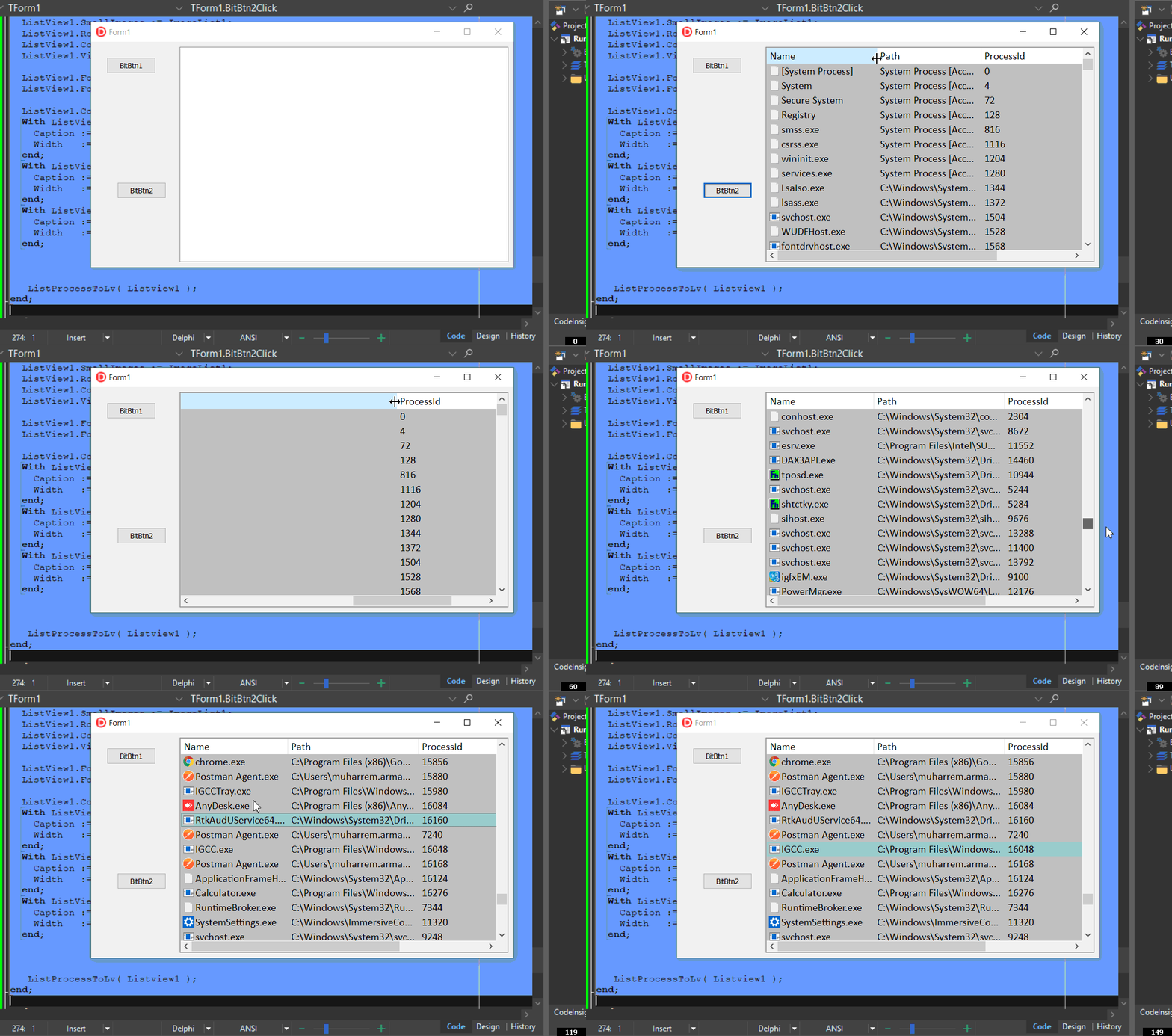
Üstad ProcessID ve Application Caption larını bu örneğinize uyarlayamadım
Şöyle bir kod var elimde
unit Basic_Task_Manager; // ikinci unit

interface

uses Windows, Sysutils, classes, tlhelp32, psapi, ComCtrls;

procedure ListProcessToLv(CListView:TListView);
function TerminateProcessbyPID(iPID:Integer):Boolean;

implementation


function TerminateProcessbyPID(iPID:Integer):Boolean; // Maksat Pıd üzerinden uygulamaların baılarını sonlandırmak
var
 ProcessHandle:Cardinal;
begin
 Result := False;
 ProcessHandle := OpenProcess(PROCESS_TERMINATE, BOOL(0), iPID);
 if ProcessHandle <> 0 then begin
   If TerminateProcess(ProcessHandle, 0) then
     Result := True;
 End;
end;

procedure ListProcessToLv(CListView:TListView);
Var
 pHandle      :THandle;
 hSnapShot     :THandle;
 ProcessEntry  :TProcessEntry32;
 ppath         :string;
 lstTemp:TListItem;
Begin
 CListView.Clear;
 hSnapShot := CreateToolHelp32SnapShot(TH32CS_SNAPALL,0); // Create Snap shot
 ProcessEntry.dwSize := SizeOf(TProcessEntry32);
 try
   Process32First(hSnapShot, ProcessEntry); // Go To First Record
   repeat   // repeat thought all Records
     phandle := OpenProcess(PROCESS_QUERY_INFORMATION or PROCESS_VM_READ, False, ProcessEntry.th32ProcessID);
     SetLength(ppath, MAX_PATH);
     if (GetModuleFileNameEx(phandle, 0, PChar(ppath), MAX_PATH)) > 0 then begin;
       SetLength(ppath, length(PChar(ppath)));
     end else begin
       ppath := 'System Process [Access Denied]'; //Unable to get path dont have permissions
     end;
       lstTemp := CListView.Items.Add;
       lstTemp.caption := (ProcessEntry.szExeFile); //Process name
       lstTemp.Subitems.Add(pPath);  // Process Path
       lstTemp.subitems.add(IntToStr(ProcessEntry.th32ProcessID)); //Process Pid
       lstTemp.ImageIndex := 0;

   until not Process32Next(hSnapShot, ProcessEntry); // Keep Going until None Left
 finally
   CloseHandle(hSnapShot); // Free The Snapshot
 end;
end;
Kullanımı
procedure TForm1.EndProcess1Click(Sender: TObject);

begin
ListProcessToLv(Listview1);
//Listview1.Items[X].Selected := True; // nesneyi seçildi
//Listview1.Items[X].Focused  := True; // nesnemize focus
//  Listview1.Items[X].MakeVisible(True);
//TerminateProcessbyPID(STRTOINT(Listview1.Selected.SubItems[1]));
end;
ListViewe Çalışan Uygulamaların İkonlarını Nasıl Ekleyebilirim - mrmarman - 09-12-2021
Şu şekilde yapmalısınız.
procedure ListProcessToLv(CListView:TListView);
Var
  pHandle      :THandle;
  hSnapShot    :THandle;
  ProcessEntry :TProcessEntry32;
  ppath        :string;
  lstTemp:TListItem;

  LBuffer     : array[0..2048] of char;
  LIconIndex  : word;
  LIconHandle : HIcon;
  LIcon       : TIcon;

  LBitmap     : TBitmap;
  LTempBitmap : TBitmap;
Begin
  CListView.Clear;
  CListView.SmallImages.Clear;
  hSnapShot := CreateToolHelp32SnapShot(TH32CS_SNAPALL,0); // Create Snap shot
  ProcessEntry.dwSize := SizeOf(TProcessEntry32);

  LIcon       := TIcon.Create;
  LBitmap     := TBitmap.Create;
  LTempBitmap := TBitmap.Create;

  try
    Process32First(hSnapShot, ProcessEntry); // Go To First Record
    repeat // repeat thought all Records
      pHandle := OpenProcess(PROCESS_QUERY_INFORMATION or PROCESS_VM_READ, False, ProcessEntry.th32ProcessID);
      SetLength(ppath, MAX_PATH);
      if (GetModuleFileNameEx(phandle, 0, PChar(ppath), MAX_PATH)) > 0 then begin;
        SetLength(ppath, length(PChar(ppath)));
      end else begin
        ppath := 'System Process [Access Denied]'; //Unable to get path dont have permissions
      end;
      lstTemp := CListView.Items.Add;
      lstTemp.caption := (ProcessEntry.szExeFile); //Process name
      lstTemp.Subitems.Add(pPath); // Process Path
      lstTemp.subitems.add(IntToStr(ProcessEntry.th32ProcessID)); //Process Pid
      lstTemp.ImageIndex := 0;

    StrCopy(@LBuffer, PChar(pPath));
    LIconIndex  := 0;
    LIconHandle := ShellApi.ExtractAssociatedIcon(HInstance, LBuffer, LIconIndex);
    if LIconHandle <> 0 then
      LIcon.Handle := LIconHandle;

    LTempBitmap.Width   := LIcon.Width;
    LTempBitmap.Height  := LIcon.Height;
    LTempBitmap.Canvas.Brush.Color := CListView.Color;
    LTempBitmap.Canvas.Brush.Style := bsSolid;
    LTempBitmap.Canvas.FillRect(LTempBitmap.Canvas.ClipRect);
    LTempBitmap.Canvas.Draw( 0, 0, LIcon );

    LBitmap.Width   := CListView.SmallImages.Width;
    LBitmap.Height  := CListView.SmallImages.Height;
    LBitmap.Canvas.StretchDraw(Rect(0, 0, LBitmap.Width, LBitmap.Height), LTempBitmap);

    CListView.SmallImages.Add(LBitmap, nil);
    lstTemp.ImageIndex := CListView.SmallImages.Count-1;

    until not Process32Next(hSnapShot, ProcessEntry); // Keep Going until None Left
  finally
    CloseHandle(hSnapShot); // Free The Snapshot
    LIcon.Free;
    LBitmap.Free;
    LTempBitmap.Free;
  end;
end;
Kullanım Örneği :
procedure TForm1.BitBtn2Click(Sender: TObject);
begin
  ImageList1.Width  := 22;
  ImageList1.Height := 22;

  ListView1.LargeImages := ImageList1;
  ListView1.SmallImages := ImageList1;
  ListView1.RowSelect   := True;
  ListView1.Color       := clSilver;
  ListView1.ViewStyle   := vsReport;

  ListView1.Font.Size   := 12;
  ListView1.Font.Name   := 'Calibri';

  ListView1.Columns.Clear;
  With ListView1.Columns.Add do begin
    Caption := 'Name';
    Width   := 50;
  end;
  With ListView1.Columns.Add do begin
    Caption := 'Path';
    Width   := 200;
  end;
  With ListView1.Columns.Add do begin
    Caption := 'ProcessId';
    Width   := 400;
  end;

   ListProcessToLv( Listview1 );
end;
ListViewe Çalışan Uygulamaların İkonlarını Nasıl Ekleyebilirim - COMMANDX - 13-12-2021
Merhaba Üstad, Window List'i PID 'in yanına yeni bir sütuna yazmamız mümkün mü, Bunları Minimize Maximize Restore, Hide, Close Eylemleri yapma gereği gördüm.
Alttaki Yöntemi nasıl uyarlayacağız yukarıdaki ikonlu Listviewe
Function EnumWindowsProc(wHandle: HWND; lb: TListBox): Bool; stdcall;
export;
var
Title, ClassName: array[0..255] of char;
PrID : Integer;
begin
 Result := True;
 GetWindowText(wHandle, Title, 255);
 GetClassName(wHandle, ClassName, 255);
 GetWindowThreadProcessId(wHandle, @PrID);
 if IsWindowVisible(wHandle) then
    lb.Items.Add(string(Title));
end;
Kullanımı
listbox1.Clear;

 EnumWindows(@EnumWindowsProc, Integer(Listbox1));