
+- Delphi Can (https://www.delphican.com)
+-- Forum: Delphi (https://www.delphican.com/forumdisplay.php?fid=3)
+--- Forum: Mobil Platform - FireMonkey (FMX) (https://www.delphican.com/forumdisplay.php?fid=7)
+--- Konu Başlığı: Google Play Billing Versiyon Sorunu[ÇÖZÜLDÜ] (/showthread.php?tid=8347)
Sayfalar:
1
2
Google Play Billing Versiyon Sorunu[ÇÖZÜLDÜ] - codder71 - 25-07-2026
Merhaba arkadaşlar
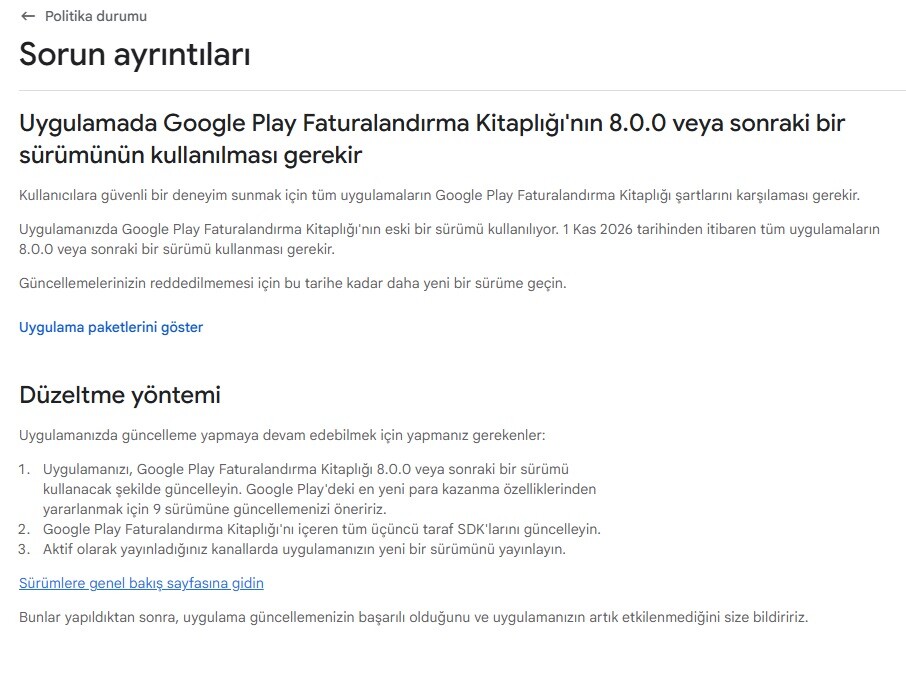
Google play de yayınladığım bir uygulamada uygulama içi satış kitaplığının eski sürüm olduğu ve en az 8.0 sürüme yükseltilmesi gerekiyor diye bir mail geldi. Sonra ide den baktığımda ise Libraries bölümünde billing-7.1.1 kullandığını gördüm.
Uygulamada FMX.InAppPurchase kullanıyorum. Bunu nasıl versiyonunu yükseltebilirim ve ya başka bir yöntemle Rad studio içinde kullanmak mümkün mü ? Böyle bir sorunla karşılaşan oldu mu arkadaşlar yardımlarınızı bekliyorum.
Google Play Gelen Bildirim :
Google Play Billing Versiyon Sorunu - emailx45 - 25-07-2026
1) Try update the library .JAR
2) try Embarcadero article
https://docwiki.embarcadero.com/RADStudio/Alexandria/en/Using_the_Google_Play_In-app_Billing_Service
3) try read Delphi-Praxys article
https://en.delphipraxis.net/topic/8197-in-app-purchase-consumable-and-subscription/
4) try catch it in Kastri github with updated files... ( Billingxxxxx.jar )
https://github.com/DelphiWorlds/Kastri/tree/master/ThirdParty/Android
5) try this article
https://delphitoptips.blogspot.com/2018/03/supporting-in-app-purchase.html?m=1
Cvp: Google Play Billing Versiyon Sorunu - codder71 - 27-07-2026
(25-07-2026, Saat: 17:23)emailx45 Adlı Kullanıcıdan Alıntı: 1) Try update the library .JAR
2) try Embarcadero article
https://docwiki.embarcadero.com/RADStudio/Alexandria/en/Using_the_Google_Play_In-app_Billing_Service
3) try read Delphi-Praxys article
https://en.delphipraxis.net/topic/8197-in-app-purchase-consumable-and-subscription/
4) try catch it in Kastri github with updated files... ( Billingxxxxx.jar )
https://github.com/DelphiWorlds/Kastri/tree/master/ThirdParty/Android
5) try this article
https://delphitoptips.blogspot.com/2018/03/supporting-in-app-purchase.html?m=1
Hocam öncelikle cevabınız için çok teşekkür ederim.
Uygulamada şuan aktif çalışan bir satın alma sistemi var abonelik şeklinde bir satın alma söz konusu değil burada yapmak istediğim şey satın alma kütüphanesini güncellemek istiyorum.
Kastri kütüphanesinde sizin de belirttiğiniz gibi bir kütüphane var ama o şuan ki sürümden daha eski bir sürüm bana en az 8 sürüm lazım delphi 13.1 kullanıyorum ve ondada 7.1.1 bulunmakta bunu güncellemek mümkün mü yada başka bir yöntem kullanarak google billing bağlanmak ve en az 8 sürümle bunu derlemek için bir yöntem varmı ?
Cvp: Google Play Billing Versiyon Sorunu - Mr.X - 27-07-2026
Merhaba,
https://mvnrepository.com/artifact/com.android.billingclient/billing/8.0.0
Bu linkten 8 sürümü ve daha üzeri için aar dosyasını edinebilirsiniz. Overview altındaki Files kısmında aar ve pom formatları bulunmakta.
Cvp: Google Play Billing Versiyon Sorunu - codder71 - 27-07-2026
(27-07-2026, Saat: 17:41)Mr.X Adlı Kullanıcıdan Alıntı: Merhaba,
https://mvnrepository.com/artifact/com.android.billingclient/billing/8.0.0
Bu linkten 8 sürümü ve daha üzeri için aar dosyasını edinebilirsiniz. Overview altındaki Files kısmında aar ve pom formatları bulunmakta.
Hocam cevabınız için öncelikle teşekkür ederim.
Belirttiğiniz siteden 8 sürümü indirdim. IDE de bulunan sürümü disable yaptım ve 8 sürümü kitaplığa yükledim fakat aşağıda ki gibi hata veriyor.
[PAClient Error] Error: E8712 C:\Users\xxx\DELPHI\Rad Studio 12\xxx\xxxx\Android64\Debug\xxxx\AndroidManifest.xml:74:81-102 Error:
[PAClient Error] Error: E8712 Attribute meta-data#com.google.android.play.billingclient.version@value value=(7.1.1) from AndroidManifest.xml:74:81-102
[PAClient Error] Error: E8712 is also present at AndroidManifest.xml:24:13-34 value=(8.0.0).
[PAClient Error] Error: E8712 Suggestion: add 'tools:replace="android:value"' to <meta-data> element at AndroidManifest.xml:74:9-105 to override.
Hatada manifest dosyasında ki sürüm 7.1.1 tanımlı diyor ama manifest dosyasında öyle bir şey yok nereden düzenleyebiliriz bunu
Google Play Billing Versiyon Sorunu - emailx45 - 28-07-2026
Try this:
1) in AndroidManifest.template.xml remove the complete Billing 7.1.1 definition ( to avoid use this versions by default )
->> <meta-data android:name="com.google.android.play.billingclient.version" android:value="7.1.1" />
2) see on AndroidManifest.template.xml if exist this:
<manifest xmlns:android="http://schemas.android.com/apk/res/android"
xmlns:tools="http://schemas.android.com/tools" <--------------------------
package="%package%" ...>
3) now, look this line is exists:
<meta-data android:name="com.google.android.play.billingclient.version"
android:value="8.0.0"
tools:replace="android:value" /> <------------------------------------
4) if persisting error:
4.1) try re-save your manifest is necessary: Delphi em Project > Options > Application > Entitlement List or Version Info
---> try change any thing and save it again!!! REBUILD app = force new changes in AndroidManifest.template.xml
4.2) do the items 1..3 above!
Tip: check the "AndroidManifest.xml" file in your app's build folder (within the final production executable directory) and look for everything related to billing settings; this way, you can see what is being injected during the merge process: (the Manifest Template) + ( the final manifest resulting from your choices ).
More in : https://developer.android.com/google/play/billing/migrate-gpblv8?hl=tr
Cvp: Google Play Billing Versiyon Sorunu - codder71 - 28-07-2026
(28-07-2026, Saat: 00:16)emailx45 Adlı Kullanıcıdan Alıntı: Try this:
1) in AndroidManifest.template.xml remove the complete Billing 7.1.1 definition ( to avoid use this versions by default )
->> <meta-data android:name="com.google.android.play.billingclient.version" android:value="7.1.1" />
2) see on AndroidManifest.template.xml if exist this:
<manifest xmlns:android="http://schemas.android.com/apk/res/android"
xmlns:tools="http://schemas.android.com/tools" <--------------------------
package="%package%" ...>
3) now, look this line is exists:
<meta-data android:name="com.google.android.play.billingclient.version"
android:value="8.0.0"
tools:replace="android:value" /> <------------------------------------
4) if persisting error:
4.1) try re-save your manifest is necessary: Delphi em Project > Options > Application > Entitlement List or Version Info
---> try change any thing and save it again!!! REBUILD app = force new changes in AndroidManifest.template.xml
4.2) do the items 1..3 above!
Tip: check the "AndroidManifest.xml" file in your app's build folder (within the final production executable directory) and look for everything related to billing settings; this way, you can see what is being injected during the merge process: (the Manifest Template) + ( the final manifest resulting from your choices ).
More in : https://developer.android.com/google/play/billing/migrate-gpblv8?hl=tr
Hocam burada anlatıldığı gibi manifesti düzenledim ve kütüphaneyi yükledim aynı zamanda 7.1.1 kaldırdım.
Uygulamayı derlemeyi başardım fakat uygulama açılmıyor direk çöküyor. Uygulama create Billing bağlantısını falan kaldırmama rağmen çöküyor.
Aşağıda manifest dosyasını yüklüyorum.
<?xml version="1.0" encoding="utf-8"?>
<!-- BEGIN_INCLUDE(manifest) -->
<manifest xmlns:android="http://schemas.android.com/apk/res/android"
   xmlns:tools="http://schemas.android.com/tools"
   package="%package%"
   android:installLocation="%installLocation%"
   android:versionCode="%versionCode%"
   android:versionName="%versionName%" >

   <uses-sdk
       android:minSdkVersion="%minSdkVersion%"
       android:targetSdkVersion="%targetSdkVersion%" />

<%uses-permission%>
   <uses-feature
       android:glEsVersion="0x00020000"
       android:required="true" />

   <queries>
<%queries-child-elements%>
   </queries>

   <application
       android:debuggable="%debuggable%"
       android:hardwareAccelerated="%hardwareAccelerated%"
       android:icon="%icon%"
       android:label="%label%"
       android:largeHeap="%largeHeap%"
       android:persistent="%persistent%"
       android:requestLegacyExternalStorage="true"
       android:resizeableActivity="true"
       android:restoreAnyVersion="%restoreAnyVersion%"
       android:theme="%theme%" >
<%provider%>
       <meta-data android:name="com.google.android.geo.API_KEY" android:value="xxxx" />
       <meta-data android:name="com.google.android.gms.version" android:value="xxx" />
       <meta-data android:name="com.google.firebase.messaging.default_notification_color" android:value="" android:resource="@color/notification_accent_color" />
       <meta-data android:name="com.google.firebase.messaging.default_notification_icon" android:value="" android:resource="@drawable/ic_notification" />
<meta-data android:name="com.google.android.play.billingclient.version"
            android:value="8.0.0"
            tools:replace="android:value" />
<%uses-libraries%>
       <!-- Trigger Google Play services to install the backported photo picker module. -->
       <service
           android:name="com.google.android.gms.metadata.ModuleDependencies"
           android:enabled="false"
           android:exported="false"
           tools:ignore="MissingClass" >
           <intent-filter>
               <action android:name="com.google.android.gms.metadata.MODULE_DEPENDENCIES" />
           </intent-filter>

           <meta-data
               android:name="photopicker_activity:0:required"
               android:value="" />
       </service>
<%services%>
       <!--
            Our activity is a subclass of the built-in NativeActivity framework class.
            This will take care of integrating with our NDK code.
       -->
       <activity
           android:name="com.embarcadero.firemonkey.FMXNativeActivity"
           android:configChanges="orientation|keyboard|keyboardHidden|screenSize|screenLayout|uiMode"
           android:enableOnBackInvokedCallback="false"
           android:exported="true"
           android:label="%activityLabel%"
           android:launchMode="singleTask" >

           <!-- Tell NativeActivity the name of our .so -->
           <meta-data
               android:name="android.app.lib_name"
               android:value="%libNameValue%" />

           <intent-filter>
               <action android:name="android.intent.action.MAIN" />

               <category android:name="android.intent.category.LAUNCHER" />
           </intent-filter>
       </activity>
<%activity%>
<%receivers%>
   </application>
</manifest>
<!-- END_INCLUDE(manifest) -->
Google Play Billing Versiyon Sorunu - emailx45 - 29-07-2026
Hata ayıklama günlüğü (tam hatayı doğrulamak için): Değişikliği yapmadan önce uygulamanın çökmesine neden olan istisnanın tam yığın izini görmek istiyorsanız, cihazınıza bağlı komut istemi üzerinden `adb logcat` komutunu çalıştırabilirsiniz:
open a CMD console ( if need use as Admin, normally not need ) and try install your app to catch the stack info...
--->> adb logcat -s AndroidRuntime FMX
NOTE: you can use the Android Studio to catch the logs... if you want! just open it and see the "Log" tab
see the attached files: by Gemini for tests ...
Cvp: Google Play Billing Versiyon Sorunu - codder71 - 31-07-2026
(29-07-2026, Saat: 01:26)emailx45 Adlı Kullanıcıdan Alıntı: Hata ayıklama günlüğü (tam hatayı doğrulamak için): Değişikliği yapmadan önce uygulamanın çökmesine neden olan istisnanın tam yığın izini görmek istiyorsanız, cihazınıza bağlı komut istemi üzerinden `adb logcat` komutunu çalıştırabilirsiniz:
open a CMD console ( if need use as Admin, normally not need ) and try install your app to catch the stack info...
--->> adb logcat -s AndroidRuntime FMX
NOTE: you can use the Android Studio to catch the logs... if you want! just open it and see the "Log" tab
see the attached files: by Gemini for tests ...
Merhabalar
Hocam çok teşekkürler.
Paylaştığınız dökümanı kullanarak Manifest dosyasını düzenledim. Aynı zamanda billing 8.0.0 ile derlemeyi gerçekleştirdim. Uygulama çökmeden açılıyor sorun oluşmuyor. Fakat Rad studio nun FMX.InAppPurchase kütüphanesi kullanılamıyor. Uygulamanın çökmesine o sebeb veriyormuş. Sizin paylaştığınız kütüphaneyi kullanarak bir yapı oluşturdum.
Hocam yapıda bir yere kadar sorunsuz çalışıyor ama sonrasında uygulama hiç tepki vermiyor hata da vermiyor ama satın alma ekranıda gelmiyor maalesef
Kodu altta paylaşıyorum.
{$IFDEF ANDROID}
type
 // Bağlantı durumunu dinleyen sınıf
 TBillingClientStateListener = class(TJavaLocal, JBillingClientStateListener)
 private
   FOnConnected: TThreadProcedure;
   FOnDisconnected: TThreadProcedure;
 public
   constructor Create(AOnConnected, AOnDisconnected: TThreadProcedure);
   procedure onBillingSetupFinished(billingResult: JBillingResult); cdecl;
   procedure onBillingServiceDisconnected; cdecl;
 end;

type
 // Satın alma sonuçlarını dinleyen zorunlu listener
 TPurchasesUpdatedListener = class(TJavaLocal, JPurchasesUpdatedListener)
 public
   procedure onPurchasesUpdated(billingResult: JBillingResult; purchases: JList); cdecl;
 end;

type
 // Ürün sorgulama sonucunu dinleyen sınıf
 TProductDetailsResponseListener = class(TJavaLocal, JProductDetailsResponseListener)
 private
 public
   constructor Create;
   procedure onProductDetailsResponse(billingResult: JBillingResult; productDetailsList: JList); cdecl;
 end;

{$ENDIF}

constructor TBillingClientStateListener.Create(AOnConnected, AOnDisconnected: TThreadProcedure);
begin
 inherited Create;
 FOnConnected := AOnConnected;
 FOnDisconnected := AOnDisconnected;
end;

procedure TBillingClientStateListener.onBillingSetupFinished(billingResult: JBillingResult); cdecl;
var
 ResCode: Integer;
 DebugMsg: string;
begin
 if Assigned(billingResult) then
 begin
   ResCode := billingResult.getResponseCode;
   DebugMsg := JStringToString(billingResult.getDebugMessage);
 end
 else
 begin
   ResCode := -1; // Bilinmeyen / Nil Yanıt
   DebugMsg := 'BillingResult nesnesi nil olarak döndü.';
 end;

 // ResponseCode = 0 -> OK
 if ResCode = TJBillingClient_BillingResponseCode.JavaClass.OK then
 begin
   TThread.Synchronize(nil,
     procedure
     begin
       if Assigned(FOnConnected) then
         FOnConnected();
     end);
 end
 else
 begin
   TThread.Synchronize(nil,
     procedure
     begin
       ShowMessage('Google Play Servis Bağlantı Hatası Kodu: ' +
         ResCode.ToString + ' - ' + DebugMsg);
     end);
 end;
end;

procedure TBillingClientStateListener.onBillingServiceDisconnected; cdecl;
begin
 TThread.Synchronize(nil,
   procedure
   begin
     if Assigned(FOnDisconnected) then
       FOnDisconnected();
   end);
end;

procedure TPurchasesUpdatedListener.onPurchasesUpdated(billingResult: JBillingResult; purchases: JList); cdecl;
begin
 // Kullanıcı bir satın alma yaptığında veya iptal ettiğinde burası tetiklenir
 if Assigned(billingResult) and (billingResult.getResponseCode = 0) then
 begin
   // Satın alma başarılı
 end;
end;

procedure TfrmSG_AnaForm.Google_Play_Satin_Alma_Setup_8_0;
var
 PendingParamsBuilder: JPendingPurchasesParams_Builder;
 PendingParams: JPendingPurchasesParams;
 ClientBuilder: JBillingClient_Builder;
begin
 FProductDetailsList := TList<JProductDetails>.Create;
 ProductListener := TProductDetailsResponseListener.Create;
 FPurchasesUpdatedListener := TPurchasesUpdatedListener.Create;

 // 1. PendingPurchasesParams
 PendingParamsBuilder := TJPendingPurchasesParams_Builder.Wrap(TJPendingPurchasesParams_Builder.JavaClass.init);
 PendingParamsBuilder.enableOneTimeProducts;
 PendingParams := PendingParamsBuilder.build;

 // 2. Client Builder
 ClientBuilder := TJBillingClient.JavaClass.newBuilder(TAndroidHelper.Context);
 ClientBuilder.setListener(FPurchasesUpdatedListener);
 ClientBuilder.enablePendingPurchases(PendingParams);

 // 3. BillingClient Oluşturma
 FBillingClient := ClientBuilder.build;

 // 4. Bağlantı Dinleyicisi
 FStateListener := TBillingClientStateListener.Create(
   OnBillingConnected,
   OnBillingDisconnected
 );

 // 5. Bağlantıyı Başlat
 FBillingClient.startConnection(FStateListener);
end;

procedure TfrmSG_AnaForm.Urunleri_Sorgula;
var
 ProductList: JArrayList;
 Product: JQueryProductDetailsParams_Product;
 QueryParamsBuilder: JQueryProductDetailsParams_Builder;
 QueryParams: JQueryProductDetailsParams;
begin
try
 if not Assigned(FBillingClient) or not FBillingClient.isReady then
 begin
   //frmSG_AnaForm.Bildirim_Mesaji('Billing servisi henüz hazır değil!', True, False);
   ShowMessage( 'Billing servisi henüz hazır değil!' );
   Exit;
 end;

 ProductList := TJArrayList.JavaClass.init;


 // --- ÜRÜN 1 ---
 Product := TJQueryProductDetailsParams_Product.JavaClass.newBuilder
   .setProductId(StringToJString(frmGoogle_Play_Satis.Elmas_100))
   .setProductType(TJBillingClient_ProductType.JavaClass.INAPP)
   .build;
 ProductList.add(Product);

 // --- ÜRÜN 2 ---
 Product := TJQueryProductDetailsParams_Product.JavaClass.newBuilder
   .setProductId(StringToJString(frmGoogle_Play_Satis.Elmas_500))
   .setProductType(TJBillingClient_ProductType.JavaClass.INAPP)
   .build;
 ProductList.add(Product);

 // --- ÜRÜN 3 ---
 Product := TJQueryProductDetailsParams_Product.JavaClass.newBuilder
   .setProductId(StringToJString(frmGoogle_Play_Satis.Elmas_1000))
   .setProductType(TJBillingClient_ProductType.JavaClass.INAPP)
   .build;
 ProductList.add(Product);

 // --- ÜRÜN 4 ---
 Product := TJQueryProductDetailsParams_Product.JavaClass.newBuilder
   .setProductId(StringToJString(frmGoogle_Play_Satis.Elmas_10000))
   .setProductType(TJBillingClient_ProductType.JavaClass.INAPP)
   .build;
 ProductList.add(Product);

 // --- ÜRÜN 5 ---
 Product := TJQueryProductDetailsParams_Product.JavaClass.newBuilder
   .setProductId(StringToJString(frmGoogle_Play_Satis.Elmas_100000))
   .setProductType(TJBillingClient_ProductType.JavaClass.INAPP)
   .build;
 ProductList.add(Product);

 if ProductList.size > 0 then
     ShowMessage( 'İçi Dolu ' );

 //ShowMessage( 'ürünleri ekledi.' );

 // --- QUERY PARAMS OLUŞTURMA (DÜZELTİLEN KISIM) ---
   QueryParamsBuilder := TJQueryProductDetailsParams.JavaClass.newBuilder;

 // 2. ArrayList'i JList interface'ine Wrap ederek Builder'a veriyoruz
   QueryParamsBuilder.setProductList(TJList.Wrap(ProductList));

 // 3. Son olarak parametre nesnesini build ediyoruz
   QueryParams := QueryParamsBuilder.build;

 //ShowMessage( 'paketlendi.' );

 // --- SORGULAMA ---
 FBillingClient.queryProductDetailsAsync(QueryParams, ProductListener);

 //ShowMessage( 'paketler yüklendi.' );

except on e : Exception do
 TThread.Synchronize( nil,
 procedure
 begin
   ShowMessage( e.Message );
 end );
end;
end;

procedure TfrmSG_AnaForm.OnBillingConnected;
begin
 // Bağlantı %100 başarılı!
 //Bildirim_Mesaji( 'Google Play Billing v8 Servisine Başarıyla Bağlanıldı! ?', True, True);
 Urunleri_Sorgula;
end;

procedure TfrmSG_AnaForm.OnBillingDisconnected;
begin
 // Bağlantı koptuğunda çalışır (örneğin Google Play Store güncellenirse)
 //ShowMessage('Billing Servis Bağlantısı Koptu, Yeniden Bağlanılıyor...');
 // İsterseniz burada SetupBilling; çağırarak tekrar bağlanmayı deneyebilirsiniz.
end;

constructor TProductDetailsResponseListener.Create;
begin
 inherited Create;
 //ShowMessage( 'Create Tetiklendi.' );
end;

procedure TProductDetailsResponseListener.onProductDetailsResponse(
 billingResult: JBillingResult; productDetailsList: JList); cdecl;
var
 ResCode: Integer;
 DebugMsg: string;
 I : Integer;
 Details: JProductDetails;
begin
 TThread.Queue( nil,
 procedure
 begin
   ShowMessage( 'Veri Geldi ' );
 end );

 ResCode := billingResult.getResponseCode;
 DebugMsg := JStringToString(billingResult.getDebugMessage);

   // 1. Durum: Google Başarılı Yanıt Dündü
   if ResCode = TJBillingClient_BillingResponseCode.JavaClass.OK then
   begin
     if Assigned(productDetailsList) and (productDetailsList.size > 0) then
     begin
       frmSG_AnaForm.FProductDetailsList.Clear;

       for I := 0 to productDetailsList.size - 1 do
       begin
         Details := TJProductDetails.Wrap(productDetailsList.get(I));
         frmSG_AnaForm.FProductDetailsList.Add(Details);
       end;

       frmSG_AnaForm.Bildirim_Mesaji('BAŞARILI: ' + IntToStr(productDetailsList.size) + ' adet ürün yüklendi!', False, False);
     end
     else
     begin
       // Google 'OK' dedi ama liste BOMBOŞ döndü!
       frmSG_AnaForm.Bildirim_Mesaji('GOOGLE BOŞ DÖNDÜ: IDler eşleşmiyor veya Play Console ürünü aktif değil!', True, False);
     end;
   end
   else
   begin
     // 2. Durum: Google Hata Döndürdü
     frmSG_AnaForm.Bildirim_Mesaji('GOOGLE HATA KODU: ' + IntToStr(ResCode) + ' - ' + DebugMsg, True, False);
   end;

end;

procedure TfrmSG_AnaForm.Urun_Satin_Al(const AProductID: string);
var
 I: Integer;
 TargetDetails: JProductDetails;
 ProductParams: JBillingFlowParams_ProductDetailsParams;
 ProductParamsList: JArrayList;
 FlowParamsBuilder: JBillingFlowParams_Builder;
 FlowParams: JBillingFlowParams;
 BillingResult: JBillingResult;
begin
try
 TargetDetails := nil;

 // 1. Daha önce sorgulayıp sakladığımız listeden tıklanan ürünü buluyoruz
 ShowMessage( FProductDetailsList.Count.ToString );

 for I := 0 to FProductDetailsList.Count - 1 do
 begin
   if JStringToString(FProductDetailsList[I].getProductId) = AProductID then
   begin
     TargetDetails := FProductDetailsList[I];
     Break;
   end;
 end;

 if not Assigned(TargetDetails) then
 begin
   frmSG_Store.Bildirim_Mesaji('Ürün detayları henüz yüklenmedi veya bulunamadı!', True, False);
   Exit;
 end;

 // 2. BillingFlowParams için ProductDetailsParams oluşturuyoruz (Billing Library v6/v7/v8 standartı)
 ProductParams := TJBillingFlowParams_ProductDetailsParams.JavaClass.newBuilder
   .setProductDetails(TargetDetails)
   .build;

 ProductParamsList := TJArrayList.JavaClass.init;
 ProductParamsList.add(ProductParams);

 // 3. BillingFlowParams nesnesini derliyoruz
 FlowParamsBuilder := TJBillingFlowParams.JavaClass.newBuilder;
 FlowParamsBuilder.setProductDetailsParamsList(TJList.Wrap(ProductParamsList));
 FlowParams := FlowParamsBuilder.build;

 // 4. Google Play Satın Alma Penceresini Açıyoruz!
 BillingResult := FBillingClient.launchBillingFlow(TAndroidHelper.Activity, FlowParams);

 if BillingResult.getResponseCode <> TJBillingClient_BillingResponseCode.JavaClass.OK then
 begin
   frmSG_Store.Bildirim_Mesaji('Satın alma başlatılamadı: ' + JStringToString(BillingResult.getDebugMessage), True, False);
 end;

except on e : Exception do
 ShowMessage( e.Message );
end;
end;

//**************************************************
Hocam burada OnBillingConnected kısmı tatikleniyor Ürün_Sorgula procedure sorunsuz çalışıyor ama google den dönüş olacak procedure TProductDetailsResponseListener.onProductDetailsResponse bu prosedür hiç tetiklenmiyor procedure nin oncreate sini kontrol ettim create oluyor fakat onProductDetailsResponse bu event hiç bir şekilde tetiklenmiyor acaba nerde yanlış yapıyorum bulamadım.
Cvp: Google Play Billing Versiyon Sorunu - emailx45 - 31-07-2026
If the freezing has stopped, that is already a good sign. It means the errors have been isolated and the flow is successfully reaching its destination. However, that doesn't guarantee that your implementation is 100% correct!
In any case, never use modal windows to display messages in a mobile environment—especially within a thread! It is always better to delegate these tasks to the system's messaging mechanism, for instance.
You could create a class using the Observer pattern to send your messages, or use the standard "TMessageManager" class, which allows you to subscribe an object—such as the active form—to receive them.
Regarding the event that isn't firing, you need to check exactly when the "Billing" library triggers it. Unfortunately, I am not very familiar with this library, so you will need to research it further to understand which events it triggers and when.
Here is a draft I put together based on your code.