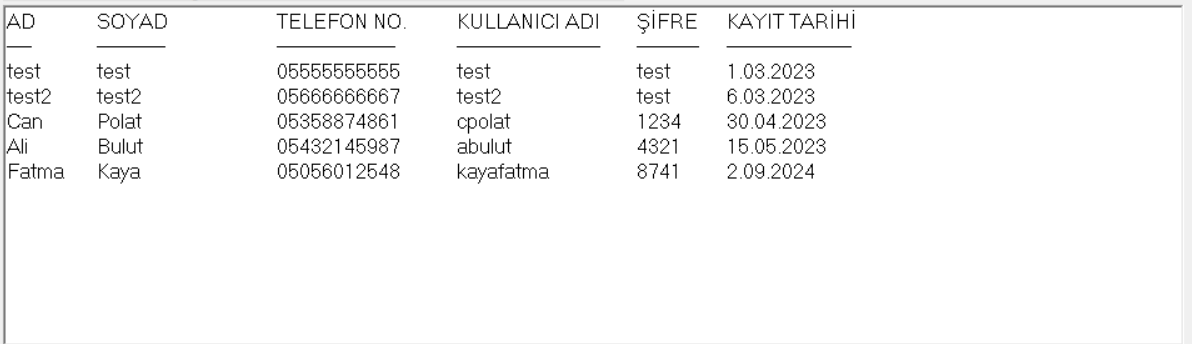
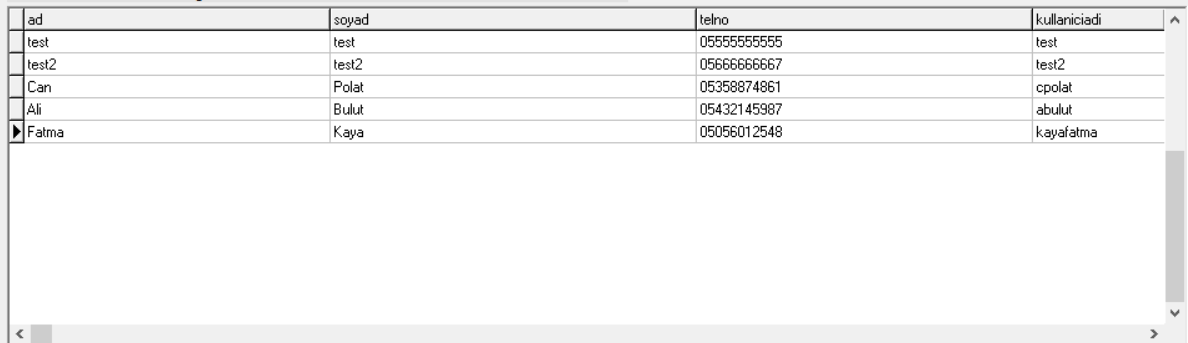
Merhaba. Delphi 7 ile bir proje geliştiriyorum. Projenin çeşitli yerlerinde MySQL kullanarak veritabanından çektiğim verileri hem memo kullanarak hem de DBGrid kullanarak listeliyorum. Örnek iki listelemeyi aşağıda görebilirsiniz. Fakat bir buton ile bu verileri aynı şekilde Excel'e aktarmam gerekiyor. Adım adım bunu nasıl yapabilirim? Yardımcı olursanız çok sevinirim.
Memo ile liste:
DBGrid ile liste:
uses ComObj


procedure TForm1.Button1Click(Sender: TObject);
var
ExcelApp,WORKBOOK,SHEET : Variant;
dosyaadi:string;
ColumnRange: OleVariant;
i:integer;
begin
if SaveDialog1.Execute then
begin
dosyaadi:=SaveDialog1.FileName;
try
  ExcelApp := CreateOleObject('Excel.Application');
  ExcelApp.workbooks.add(-4167);
  ExcelApp.CELLS[1,1]:='AD';
  ExcelApp.CELLS[1,2]:='SOYAD';
  ExcelApp.CELLS[1,3]:='TELEFON NO';
  ExcelApp.CELLS[1,4]:='KULLANICI ADI';
  ExcelApp.CELLS[1,5]:='ŞİFRE';
  ExcelApp.CELLS[1,6]:='TARİH';
  ColumnRange := ExcelApp.Workbooks[1].WorkSheets[1].Columns;
  ColumnRange.Columns[1].ColumnWidth := 20;
  ColumnRange.Columns[2].ColumnWidth := 30;
  ColumnRange.Columns[3].ColumnWidth := 30;
  ColumnRange.Columns[4].ColumnWidth := 30;
  ColumnRange.Columns[5].ColumnWidth := 30;
  ColumnRange.Columns[6].ColumnWidth := 30;
  Repeat
      if i=100 then break else
      begin
        inc(i);
        ExcelApp.CELLS[i+1,1]:='Adı '+IntToStr(i);
        ExcelApp.CELLS[i+1,2]:='Soyadı '+IntToStr(i);
        ExcelApp.CELLS[i+1,3]:='Telefon '+IntToStr(i);
        ExcelApp.CELLS[i+1,4]:='Kullanıcı Adı '+IntToStr(i);
        ExcelApp.CELLS[i+1,5]:='Şifre '+IntToStr(i);
        ExcelApp.CELLS[i+1,6]:='01.01.2023'
      end;
  Until 1=2;
ExcelApp.DisplayAlerts := False;
ExcelApp.Visible:= True;
ExcelApp.ActiveWorkBook.SaveAs(dosyaadi);
finally
 if not VarIsEmpty(ExcelApp) then
    begin
        ExcelApp.DisplayAlerts := False;
        ExcelApp.Quit;
        ExcelApp := Unassigned;
    end;
end;
end;
end;
https://www.swissdelphicenter.ch/en/showcode.php?id=156
(01-05-2023, Saat: 09:50)elixir84 Adlı Kullanıcıdan Alıntı: [ -> ]procedure TForm1.Button1Click(Sender: TObject);
uses ComObj
procedure TForm1.Button1Click(Sender: TObject);
var
ExcelApp,WORKBOOK,SHEET : Variant;
dosyaadi:string;
ColumnRange: OleVariant;
i:integer;
begin
if SaveDialog1.Execute then
begin
dosyaadi:=SaveDialog1.FileName;
try
ExcelApp := CreateOleObject('Excel.Application');
ExcelApp.workbooks.add(-4167);
ExcelApp.CELLS[1,1]:='AD';
ExcelApp.CELLS[1,2]:='SOYAD';
ExcelApp.CELLS[1,3]:='TELEFON NO';
ExcelApp.CELLS[1,4]:='KULLANICI ADI';
ExcelApp.CELLS[1,5]:='ŞİFRE';
ExcelApp.CELLS[1,6]:='TARİH';
ColumnRange := ExcelApp.Workbooks[1].WorkSheets[1].Columns;
ColumnRange.Columns[1].ColumnWidth := 20;
ColumnRange.Columns[2].ColumnWidth := 30;
ColumnRange.Columns[3].ColumnWidth := 30;
ColumnRange.Columns[4].ColumnWidth := 30;
ColumnRange.Columns[5].ColumnWidth := 30;
ColumnRange.Columns[6].ColumnWidth := 30;
Repeat
if i=100 then break else
begin
inc(i);
ExcelApp.CELLS[i+1,1]:='Adı '+IntToStr(i);
ExcelApp.CELLS[i+1,2]:='Soyadı '+IntToStr(i);
ExcelApp.CELLS[i+1,3]:='Telefon '+IntToStr(i);
ExcelApp.CELLS[i+1,4]:='Kullanıcı Adı '+IntToStr(i);
ExcelApp.CELLS[i+1,5]:='Şifre '+IntToStr(i);
ExcelApp.CELLS[i+1,6]:='01.01.2023'
end;
Until 1=2;
ExcelApp.DisplayAlerts := False;
ExcelApp.Visible:= True;
ExcelApp.ActiveWorkBook.SaveAs(dosyaadi);
finally
if not VarIsEmpty(ExcelApp) then
begin
ExcelApp.DisplayAlerts := False;
ExcelApp.Quit;
ExcelApp := Unassigned;
end;
end;
end;
end;
https://www.swissdelphicenter.ch/en/showcode.php?id=156
Hocam sadece aşağıdaki kodu kullanarak basit bir excel açmaya çalıştığımda 'Geçersiz sınıf dizesi' hatası alıyorum. Neden olabilir? Bilgisayarda Office yüklü ve uses'a ComObj ekledim.
procedure TForm1.Button1Click(Sender: TObject);
var
ExcelApp : Variant;
begin
ExcelApp := CreateOleObject('Excel.Appliaction');
ExcelApp.workbooks.add(1);
ExcelApp.CELLS[1,1]:='AD';
ExcelApp.CELLS[1,2]:='SOYAD';
ExcelApp.visible := true;
end;
(01-05-2023, Saat: 10:54)mahone Adlı Kullanıcıdan Alıntı: [ -> ] (01-05-2023, Saat: 09:50)elixir84 Adlı Kullanıcıdan Alıntı: [ -> ]procedure TForm1.Button1Click(Sender: TObject);
uses ComObj
procedure TForm1.Button1Click(Sender: TObject);
var
ExcelApp,WORKBOOK,SHEET : Variant;
dosyaadi:string;
ColumnRange: OleVariant;
i:integer;
begin
if SaveDialog1.Execute then
begin
dosyaadi:=SaveDialog1.FileName;
try
ExcelApp := CreateOleObject('Excel.Application');
ExcelApp.workbooks.add(-4167);
ExcelApp.CELLS[1,1]:='AD';
ExcelApp.CELLS[1,2]:='SOYAD';
ExcelApp.CELLS[1,3]:='TELEFON NO';
ExcelApp.CELLS[1,4]:='KULLANICI ADI';
ExcelApp.CELLS[1,5]:='ŞİFRE';
ExcelApp.CELLS[1,6]:='TARİH';
ColumnRange := ExcelApp.Workbooks[1].WorkSheets[1].Columns;
ColumnRange.Columns[1].ColumnWidth := 20;
ColumnRange.Columns[2].ColumnWidth := 30;
ColumnRange.Columns[3].ColumnWidth := 30;
ColumnRange.Columns[4].ColumnWidth := 30;
ColumnRange.Columns[5].ColumnWidth := 30;
ColumnRange.Columns[6].ColumnWidth := 30;
Repeat
if i=100 then break else
begin
inc(i);
ExcelApp.CELLS[i+1,1]:='Adı '+IntToStr(i);
ExcelApp.CELLS[i+1,2]:='Soyadı '+IntToStr(i);
ExcelApp.CELLS[i+1,3]:='Telefon '+IntToStr(i);
ExcelApp.CELLS[i+1,4]:='Kullanıcı Adı '+IntToStr(i);
ExcelApp.CELLS[i+1,5]:='Şifre '+IntToStr(i);
ExcelApp.CELLS[i+1,6]:='01.01.2023'
end;
Until 1=2;
ExcelApp.DisplayAlerts := False;
ExcelApp.Visible:= True;
ExcelApp.ActiveWorkBook.SaveAs(dosyaadi);
finally
if not VarIsEmpty(ExcelApp) then
begin
ExcelApp.DisplayAlerts := False;
ExcelApp.Quit;
ExcelApp := Unassigned;
end;
end;
end;
end;
https://www.swissdelphicenter.ch/en/showcode.php?id=156
Hocam sadece aşağıdaki kodu kullanarak basit bir excel açmaya çalıştığımda 'Geçersiz sınıf dizesi' hatası alıyorum. Neden olabilir? Bilgisayarda Office yüklü ve uses'a ComObj ekledim.
procedure TForm1.Button1Click(Sender: TObject);
var
ExcelApp : Variant;
begin
ExcelApp := CreateOleObject('Excel.Appliaction');
ExcelApp.workbooks.add(1);
ExcelApp.CELLS[1,1]:='AD';
ExcelApp.CELLS[1,2]:='SOYAD';
ExcelApp.visible := true;
end;
Bilgisayarında Microsoft Office olmak zorunda.
(01-05-2023, Saat: 11:46)elixir84 Adlı Kullanıcıdan Alıntı: [ -> ] (01-05-2023, Saat: 10:54)mahone Adlı Kullanıcıdan Alıntı: [ -> ]Hocam sadece aşağıdaki kodu kullanarak basit bir excel açmaya çalıştığımda 'Geçersiz sınıf dizesi' hatası alıyorum. Neden olabilir? Bilgisayarda Office yüklü ve uses'a ComObj ekledim.
procedure TForm1.Button1Click(Sender: TObject);
var
ExcelApp : Variant;
begin
ExcelApp := CreateOleObject('Excel.Appliaction');
ExcelApp.workbooks.add(1);
ExcelApp.CELLS[1,1]:='AD';
ExcelApp.CELLS[1,2]:='SOYAD';
ExcelApp.visible := true;
end;
Bilgisayarında Microsoft Office olmak zorunda.
Hocam zaten Microsoft Office yüklü ama sorunu garip bir şekilde çözdüm. CTRL'ye basılı tutup CreateOleObject koduna tıklayıp o kütüphaneyi bir kez açınca çalışmaya başladı. Teşekkür ederim.
Uygulama derlenip çalıştıktan sonra arkada bir kaç kez açık durumda Excel dosyaları açılmış olabilir. onları sonlandırın tekrar çalıştırın.
(01-05-2023, Saat: 10:54)mahone Adlı Kullanıcıdan Alıntı: [ -> ]Hocam sadece aşağıdaki kodu kullanarak basit bir excel açmaya çalıştığımda 'Geçersiz sınıf dizesi' hatası alıyorum. Neden olabilir? Bilgisayarda Office yüklü ve uses'a ComObj ekledim.
procedure TForm1.Button1Click(Sender: TObject);
var
ExcelApp : Variant;
begin
ExcelApp := CreateOleObject('Excel.Appliaction'); <------- DİKKAT APPLIACTION YAZMIŞSINIZ Application olacak
ExcelApp.workbooks.add(1);
ExcelApp.CELLS[1,1]:='AD';
ExcelApp.CELLS[1,2]:='SOYAD';
ExcelApp.visible := true;
end;
ExcelApp := CreateOleObject('
Excel.Appliaction'); <------- DİKKAT
APPLIACTION YAZMIŞSINIZ
Application olacak
