Merhaba.
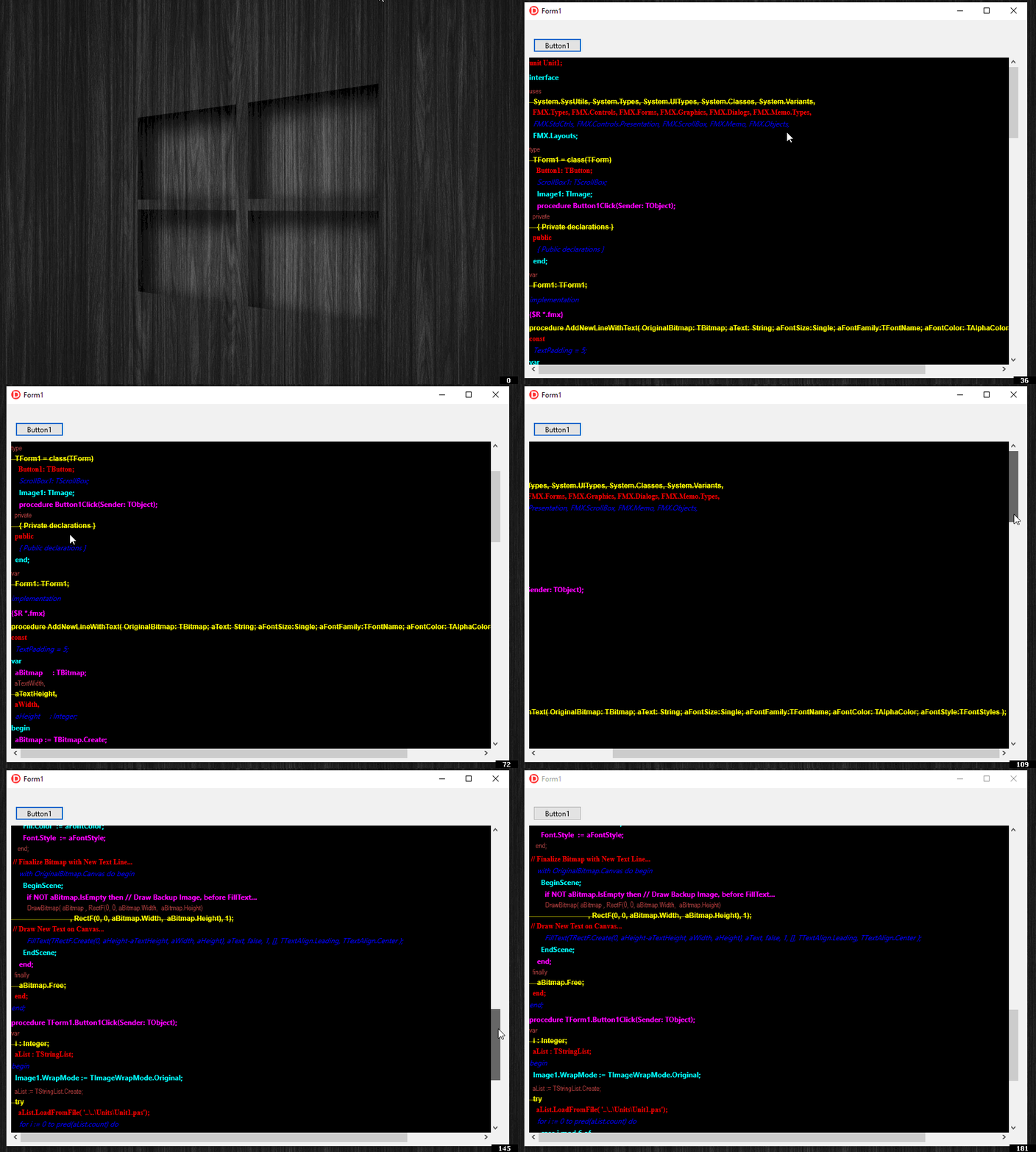
- Readonly ise şöyle basit bir örnek hazırladım sizin için. Size metni parse ederek nerede hangi renk çıktı verilecek ise orada ilgili renkte baskı yapmak kalıyor.
Formun üzerine Memo yerine bir
TScrollBox ( sağa sola, yukarı aşağı scroll yapabilmek için ) ve bunun içine bir tane boyutu önemli değil, sadece Alignment özelliği alNone olan, boyutunu bizim değiştrebileceğimiz, dolayısıyla ScrollBox devreye alabilecek bir
TImage ekleyiniz.
- Aşağıdaki Procedure sizin için hazırladığım
procedure AddNewLineWithText( OriginalBitmap: TBitmap; aText: String; aFontSize:Single; aFontFamily:TFontName; aFontColor: TAlphaColor; aFontStyle:TFontStyles );
const
 TextPadding = 5;
var
 aBitmap     : TBitmap;
 aTextWidth,
 aTextHeight,
 aWidth,
 aHeight     : Integer;
begin
 aBitmap := TBitmap.Create;
 try
// Original Image Backup if exists....
   if NOT OriginalBitmap.IsEmpty then
     aBitmap.Assign( OriginalBitmap );

// Font Defines will needed by Canvas Text Measurement....
   with OriginalBitmap.Canvas do begin
     Font.Size   := aFontSize;
     Font.Family := aFontFamily;
     Fill.Color  := aFontColor;
     Font.Style  := aFontStyle;
     aTextWidth  := Trunc( TextWidth ( aText ) ) + TextPadding;
     aTextHeight := Trunc( TextHeight( aText ) ) + TextPadding;

     if OriginalBitmap.IsEmpty then begin
       aWidth    := aTextWidth;
       aHeight   := aTextHeight;
     end else begin
       aWidth    := Width;
       aHeight   := Height;
     end;
// Set New Image Size...
     if NOT OriginalBitmap.IsEmpty then begin
       if aTextWidth > aWidth then
         aWidth  := Trunc( aTextWidth );
       aHeight   := Height + aTextHeight;
     end;
   end;

   OriginalBitmap.SetSize( aWidth, aHeight ); // Resize Image with new size...
   OriginalBitmap.Clear(TAlphaColors.black);
   with OriginalBitmap.Canvas do begin // Reformat Canvas Font for painting...
     Font.Size   := aFontSize;
     Font.Family := aFontFamily;
     Fill.Color  := aFontColor;
     Font.Style  := aFontStyle;
   end;

// Finalize Bitmap with New Text Line...
   with OriginalBitmap.Canvas do begin
     BeginScene;
       if NOT aBitmap.IsEmpty then // Draw Backup Image, before FillText...
         DrawBitmap( aBitmap , RectF(0, 0, aBitmap.Width,  aBitmap.Height)
                             , RectF(0, 0, aBitmap.Width,  aBitmap.Height), 1);
// Draw New Text on Canvas...
       FillText(TRectF.Create(0, aHeight-aTextHeight, aWidth, aHeight), aText, false, 1, [], TTextAlign.Leading, TTextAlign.Center );
     EndScene;
   end;
 finally
   aBitmap.Free;
 end;
end;
Kullanımı için ise şu şekilde bir reelshow hazırladım.
procedure TForm1.Button1Click(Sender: TObject);
var
 i : Integer;
 aList : TStringList;
begin
 Image1.WrapMode := TImageWrapMode.Original;

 aList := TStringList.Create;
 try
   aList.LoadFromFile( '..\..\Units\Unit1.pas');
   for i := 0 to pred(aList.count) do
     case i mod 6 of
     0:  AddNewLineWithText( Image1.Bitmap, aList[i], 12, 'Times New Roman',   TAlphaColors.Red,     [ TFontStyle.fsBold] );
     1:  AddNewLineWithText( Image1.Bitmap, aList[i], 12, 'Courirer New',      TAlphaColors.Blue,    [ TFontStyle.fsItalic] );
     2:  AddNewLineWithText( Image1.Bitmap, aList[i], 12, 'Calibti',           TAlphaColors.Aqua,    [ TFontStyle.fsBold] );
     3:  AddNewLineWithText( Image1.Bitmap, aList[i], 12, 'Verdena',           TAlphaColors.Fuchsia, [ TFontStyle.fsBold] );
     4:  AddNewLineWithText( Image1.Bitmap, aList[i], 12, 'Arial Narrow',      TAlphaColors.Brown,   [ ] );
     5:  AddNewLineWithText( Image1.Bitmap, aList[i], 12, 'Arial Bold',        TAlphaColors.Yellow,  [ TFontStyle.fsBold, TFontStyle.fsStrikeOut] );
     end;
 finally
   aList.Free;
 end;

 Image1.Height := Image1.Bitmap.Height;
 Image1.Width  := Image1.Bitmap.Width;
end;
Sonucu aşağıdaki şekilde.